

La Sentinelle antispam is a handy plugin for securing your site’s forms and limiting spam. It protects native WordPress forms: comments, login, registration and forgotten password. The Sentinel also integrates forms added by many plugins such as Contact Form 7, Forminator, WooCommerce and Easy Digital Downloads.
A quick, concise guide to configuring your Sentinel’s general settings and protecting Contact Form 7 forms with a Honeypot.
General settings
Settings page
You’ll find the settings page for the La Sentinelle antispam plugin in your site’s administration interface: Settings > La Sentinelle.
Quick setup
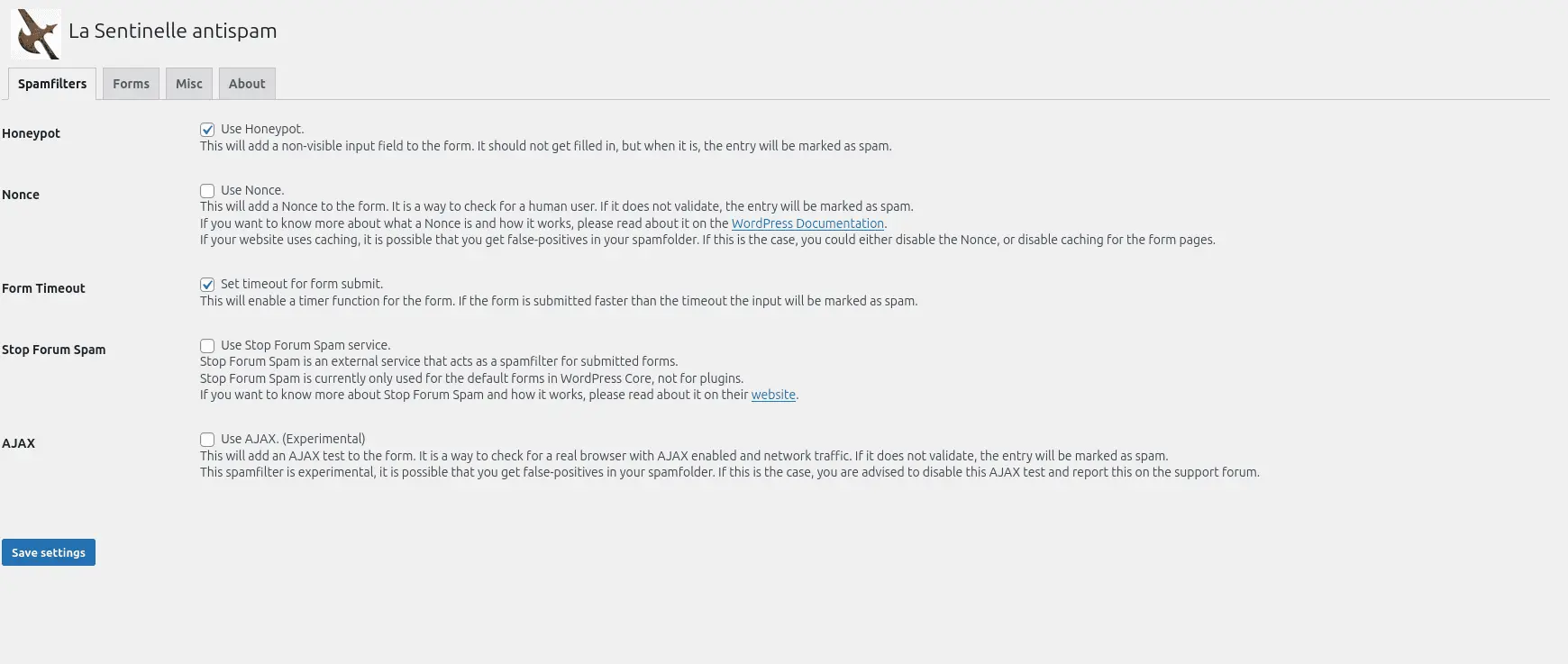
The following configuration is simple: it will considerably limit spam on most sites, while allowing the administrator to control any false positives by temporarily registering spam.
Options not listed below are not activated.
Filter out unwanted guests
✅ Use Honeypot.
✅ Set timeout for form submit.
Forms
✅ Enable spamfilters for WordPress Comment Forms.
✅ Enable spamfilters for WordPress Login Form.
✅ Enable spamfilters for WordPress Reset Password Form.
✅ Enable spamfilters for WordPress Register Form.
Miscellaneous
✅ Save spam submissions.
✅ Remove old spam submissions.
Protecting CF7 forms
To protect a form, go to the dedicated page in your site’s administration interface: Contact > Contact forms, then edit the form you wish to protect.
Once on your form’s editing interface, simply add a “Sentinel” field by clicking on the dedicated button (see screenshot) located above the textarea zone.

A configuration window opens, leaving the default fields and clicking on “Insert tag”.

Be sure to insert the Sentinel tag BEFORE the form submission tag, as shown below 👇️
# Tag for the Contact Form 7 submit button
[submit "Send"]Code language: PHP (php)
For better readability, I like to segment my fields into labels :
# Honeypot
<label>[la_sentinelle la_sentinelle-713]</label>Code language: PHP (php)
La Sentinelle antispam, an easy-to-use anti-spam plugin
We’ve seen how to quickly set up high-performance protection for your WordPress forms, while remaining transparent to the web user, who is not hindered by CAPTCHA and other checks. What’s more, everything is processed locally on your site, giving you greater control over your users’ data.
If you’d like to find out more about La Sentinelle antispam, please visit the plugin’s official page on the WordPress repository.
I hope this post helps you. If you have any questions, need help with your site, or would like to make a contribution, please don’t hesitate to contact me or leave a comment!

Leave a Reply